


5 Hidden Logitech G305 Features You Should Know About
Five Logitech G305 features most owners miss: Endurance mode, onboard memory, the receiver slot, the HERO sensor and smart battery tricks.

Quick take: The Logitech G305 LIGHTSPEED is a small, simple wireless gaming mouse that hides a lot of control behind its plain shell. The Logitech G305 features most buyers never touch are the ones that matter most: a power mode that trades polling rate for months of battery life, an onboard profile that travels with the mouse, and a receiver that tucks inside it. Here are the five I think are worth knowing, all checked against Logitech's own specs.
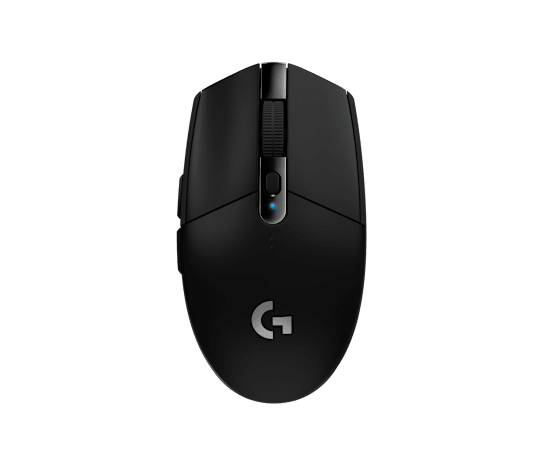
I've used the G305 as an everyday mouse, and it's easy to treat it as a plug-and-play budget pick and never open the settings. That's a shame, because the hardware is better than its price suggests. Logitech pairs its HERO optical sensor with LIGHTSPEED wireless and powers the whole thing with a single AA battery. If you want to check current pricing first, you can see the Logitech G305 on Amazon.
Logitech G305 Features and Specs at a Glance
| Spec | Logitech G305 LIGHTSPEED |
|---|---|
| Sensor | HERO optical sensor |
| Resolution | 200 – 12,000 DPI |
| Max speed / acceleration | Over 400 IPS / over 40 G (Logitech's figures) |
| Smoothing / filtering / acceleration | None |
| Wireless | LIGHTSPEED 2.4 GHz with USB receiver |
| Report rate | 1,000 Hz (1 ms); 500, 250 or 125 Hz selectable |
| Battery | 1 × AA, not rechargeable |
| Battery life | Up to 250 hours (Performance mode) |
| Weight | 99 g with the AA battery |
| Dimensions | 116.6 × 62.15 × 38.2 mm |
| Buttons | 6 programmable |
| Onboard memory | 1 profile |
| Compatibility | Windows, macOS, ChromeOS (USB port needed) |
What about "HERO 12K"?
The Amazon listing calls the sensor "Hero 12K". The "12K" simply refers to this HERO sensor's 12,000 DPI maximum, which matches the 200–12,000 DPI range on Logitech's own G305 page. Logitech also sells a newer G305 LIGHTSPEED SE edition and has newer HERO sensors (the G309, for example, uses HERO 25K). If you specifically want this original model, check that the listing you open still says G305 LIGHTSPEED with the HERO 12K sensor.
1. The Endurance Mode Hidden in G HUB
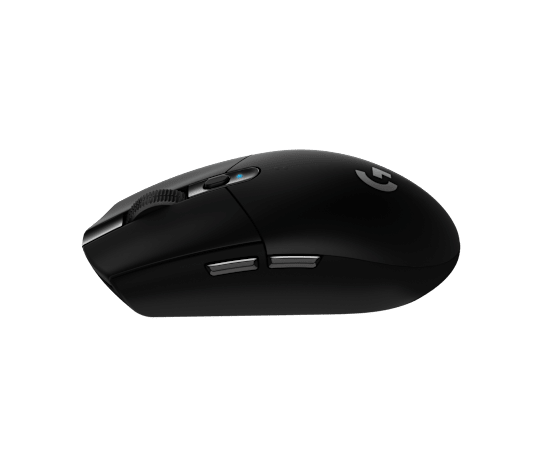
The headline battery figure is up to 250 hours of continuous use on one AA. That is in Performance mode, where the mouse reports to your PC 1,000 times per second. What many owners miss is the second power mode.
In Endurance mode, Logitech's support documentation says the report rate is fixed at 8 ms (125 Hz) to maximize battery life. Logitech's retail spec sheets quote up to 9 months of typical use in this mode. 125 Hz is too slow for competitive shooters, but it's fine for office work, browsing and slower games.
How to switch:
- Install Logitech G HUB and open it with the receiver plugged in.
- Select the G305, then open its settings.
- Find the power mode drop-down and choose Endurance (low) or Performance (high).
- In Performance mode you can also pick 1,000, 500, 250 or 125 Hz if you want a middle ground.
If you split one mouse between work and play, this is the first setting I'd change.
2. Onboard Memory: Your Settings Travel With the Mouse
G HUB is optional. The G305 works as a normal mouse without any software, but if you do set up DPI steps and button assignments, you can save them to the mouse's onboard profile. Reviewers at Tom's Hardware point out that this means your settings carry across PCs, even ones that will never have G HUB installed.
That's useful on a work laptop where you can't install software, at a LAN event, or on a Chromebook. A practical setup:
- In G HUB, set your preferred DPI steps (for example, a low step for aiming and a higher one for desktop use).
- Assign the two thumb buttons and the DPI button to whatever you use most.
- Turn on onboard memory mode and save the profile to the mouse.
- Unplug the receiver, move it to another computer, and your setup comes with it.
There is only one onboard profile, so pick the setup you use most and leave game-specific profiles to G HUB on your main PC.
3. The Receiver Garage Inside the Mouse
Pop off the top shell and you'll find the AA battery and, next to it, a slot that holds the USB LIGHTSPEED receiver. It's a small detail, but it means the receiver isn't loose in a bag or lost in a drawer when you travel.
Logitech also includes a USB extension cable. It's worth using on a desktop PC where the only free ports are at the back of the case. Putting the receiver on your desk, closer to the mouse, gives the 2.4 GHz link a shorter, clearer path, which helps in rooms with a lot of other wireless gear.
4. A HERO Sensor That Doesn't Fudge Your Aim
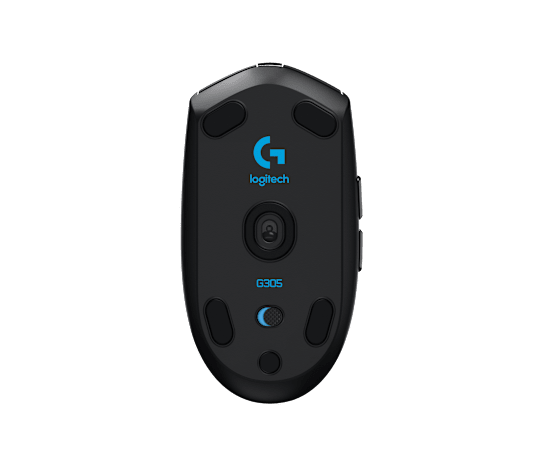
HERO is Logitech's own optical sensor. On the G305 it covers 200 to 12,000 DPI and, according to Logitech, it tracks accurately at over 400 IPS with zero smoothing, filtering or acceleration. In plain terms, the cursor moves exactly as far as your hand does, at any speed.
HERO is also part of why a single AA lasts so long. Logitech markets HERO as delivering "10X efficiency" over its earlier sensors. You'll rarely need the full 12,000 DPI, but the wide range lets you set fine-grained steps in G HUB.
The bottom also has PTFE feet, which Logitech rates for 250 km of travel on its own G240 mouse pad.
5. The Battery Tricks Owners Use
Because the G305 runs on a standard AA, battery management is partly up to you, and owners have a few habits worth borrowing:
- Watch the low-battery light. The LED near the scroll wheel flashes red when the battery gets low. Logitech's spec sheets put the warning at about 15% remaining, and G HUB shows the exact level.
- Use rechargeable AAs. Keeping two NiMH cells and swapping them is a common owner workaround for the "not rechargeable" complaint.
- Lighter cells and the AAA-adapter trick. Some owners fit a lighter lithium AA, or an AAA battery in an AA-sized adapter, to cut weight below the stock 99 g. This is a community mod, not something Logitech supports. A AAA holds much less charge, so expect noticeably shorter battery life, and make sure the adapter fits snugly so the cell doesn't rattle or lose contact.
Personally, I found the stock 99 g weight perfectly manageable for everyday use, so I'd only bother with the AAA trick if you play fast-flicking shooters.
Pros and Cons
Pros
- HERO sensor with no smoothing or acceleration across 200–12,000 DPI
- LIGHTSPEED wireless at 1,000 Hz (1 ms)
- Up to 250 hours on one AA, much longer in Endurance mode
- Onboard profile works without software
- Receiver stores inside the mouse, and an extension cable is included
- Omron main switches rated for 10 million clicks (per TechPowerUp's teardown)
Cons
- Not rechargeable out of the box; you buy batteries or NiMH cells
- No Bluetooth, so it always needs the USB receiver
- Small shape can feel cramped for larger hands, as reviewers often note
- Only one onboard profile
- 99 g is heavier than many modern lightweight wireless mice
How It Compares
| Logitech G305 | Logitech G309 LIGHTSPEED | Razer Orochi V2 | |
|---|---|---|---|
| Sensor | HERO (12,000 DPI max) | HERO 25K (25,600 DPI max) | Razer 5G Advanced Optical |
| Connection | LIGHTSPEED (USB receiver) | LIGHTSPEED + Bluetooth | HyperSpeed (USB) + Bluetooth |
| Battery | 1 × AA | 1 × AA | 1 × AA or AAA |
| Battery life (Logitech/Razer claims) | Up to 250 h | ~300 h LIGHTSPEED, ~600 h Bluetooth | Up to 425 h HyperSpeed, 950 h Bluetooth |
| Weight | 99 g with AA | 86 g with AA | Under 60 g without battery |
| Buttons | 6 | 7 | 6 |
The G309 is the natural upgrade if you want Bluetooth for a second device and a newer sensor. The Orochi V2 is the pick if low weight and official AAA support matter most. Of the three, the Logitech G305 features the simplest setup, a proven sensor and typically the lowest price.
Buying Checklist
- [ ] You're fine with a small-to-medium shape (116.6 mm long)
- [ ] You have, or will buy, AA batteries or rechargeable NiMH cells
- [ ] You only need to connect to one computer at a time (no Bluetooth)
- [ ] You have a free USB-A port, or an adapter, for the receiver
- [ ] The listing still names the G305 LIGHTSPEED with the HERO 12K sensor, if you want the original model
If those boxes are ticked, you can check the Logitech G305's current price.
Verdict
The G305 has been around for years because the basics are right: a precise HERO sensor, a dependable LIGHTSPEED connection and long battery life on a single AA. The real value is in the Logitech G305 features under the hood. Use Endurance mode when you're not gaming, save your setup to the onboard profile, keep the receiver in its slot, and manage the battery the way experienced owners do. In my experience it's an easy mouse to recommend as a first wireless gaming mouse or a travel mouse. Just know that rivals now offer Bluetooth, rechargeable batteries or lower weight.
Ready to grab one? Buy the Logitech G305 LIGHTSPEED on Amazon.
Some links in this article are affiliate links — see our affiliate disclosure. Want to know how we pick products? Read more about TwizzyMedia.
Frequently asked questions
What DPI range does the Logitech G305 support?
The G305's HERO sensor covers 200 to 12,000 DPI, with no smoothing, filtering or acceleration according to Logitech. The "12K" in some listings refers to that 12,000 DPI maximum.
How long does the Logitech G305 battery last?
Logitech rates it for up to 250 hours of continuous use on one AA battery in Performance mode. Endurance mode fixes the report rate at 125 Hz and, per Logitech's spec sheets, can stretch a battery to up to 9 months of typical use.
Is the Logitech G305 rechargeable?
No. It runs on a single AA battery and has no built-in rechargeable cell. Many owners use rechargeable NiMH AA batteries instead of disposables.
Does the Logitech G305 have onboard memory?
Yes. It has one onboard profile, so DPI and button settings saved from G HUB work on other computers without the software installed.
Where is the Logitech G305 USB receiver stored?
Under the top shell, in a slot next to the AA battery. Logitech also includes a USB extension cable for the receiver.
Does the Logitech G305 support Bluetooth?
No. The G305 connects only through its LIGHTSPEED 2.4 GHz USB receiver. Models such as the Logitech G309 add Bluetooth.