


5 Hidden Features of the HP PageWide Pro 577dw You Must Know About
Five lesser-known PageWide Pro 577dw features, from PIN printing to single-pass duplex scanning, plus verified specs, ink yields and buying advice for 2026.
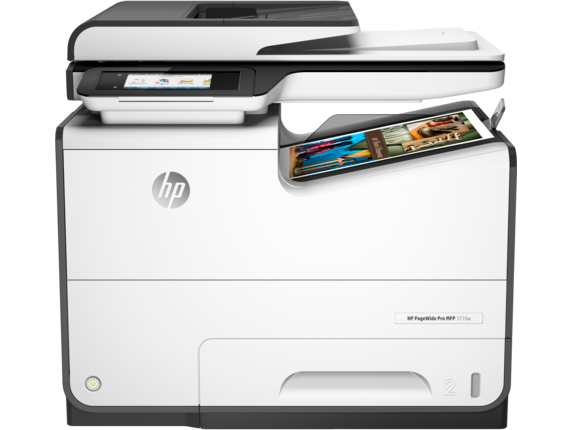
Quick take: The HP PageWide Pro 577dw is a 2016-era business color MFP that prints up to 50 ppm in its standard (ISO) mode and up to 70 ppm in General Office mode, with a single-pass two-sided document feeder and very high-yield cartridges. HP has discontinued it, so you'll mostly find remaining stock, refurbished or used units. If you can get one at a fair price, it's still a fast, economical workhorse. Check current price and availability on Amazon.
The HP PageWide Pro 577dw sits between a traditional inkjet and a workgroup laser. Instead of a print head shuttling back and forth, it uses a stationary print bar that spans the full width of the page, so each sheet is printed in a single pass. Most people buy it for the headline speed and cartridge yields, but there's a layer of features beneath that which often goes unused.
Below are five of them, each checked against HP's own datasheet and product page and against published reviews. Where my original notes got a spec wrong, I've corrected it.
PageWide Pro 577dw specs at a glance
| Spec | HP PageWide Pro 577dw (D3Q21A) |
|---|---|
| Technology | HP PageWide (stationary print bar), pigment ink |
| Print speed | Up to 50 ppm black and color (ISO, Professional mode); up to 70 ppm in General Office mode |
| First page out | As fast as 6 s (black) / 6.5 s (color), from ready |
| Monthly duty cycle | Up to 80,000 pages |
| Recommended monthly volume | 1,000–6,000 pages |
| Paper input | 500-sheet tray + 50-sheet multipurpose tray; optional 500-sheet tray or 2×500-sheet tray and stand (up to 3 trays) |
| Output | 300-sheet face-down bin |
| Duplex | Automatic two-sided printing |
| Scanner / ADF | Flatbed plus 50-sheet single-pass, two-sided ADF; legal-size scanning |
| Display | 4.3-inch color touchscreen |
| Processor / memory | 1.2 GHz / 768 MB |
| Connectivity | Ethernet, Wi-Fi 802.11b/g/n, Wi-Fi Direct, NFC touch-to-print, 2 USB host ports, fax |
| Cartridges (US) | HP 972A, 972X and 976Y (extra high yield) |
| Launched | 2016; now discontinued by HP |
1. Secure boot, PIN printing and Color Access Control
Networked printers are a common soft spot in office security. My original draft credited the 577dw with HP Sure Start BIOS self-healing and run-time intrusion detection. That's not accurate: HP markets those as features of its Enterprise (FutureSmart) printers, and the 577dw's datasheet doesn't list them.
What the PageWide Pro 577dw does have, according to HP:
- Secure boot and secure code integrity validation, so the printer checks that its firmware is genuine when it starts up
- Signed firmware, a password-protected Embedded Web Server and a control panel lock
- PIN-protected printing (via HP's Universal Print Driver): the job waits in the printer until someone enters the PIN on the 4.3-inch touchscreen
- HP Color Access Control, which lets an admin limit who can print in color
- Compatibility with the optional HP JetAdvantage Security Manager for fleet policy
PIN printing is the one I'd turn on first in any shared office. Payroll, HR letters and contracts no longer sit in the output tray for anyone to pick up.
How to use PIN printing:
- Install the HP Universal Print Driver (UPD) on the PC.
- In the print dialog, open the job storage options and choose a PIN-protected job.
- Enter a four-digit PIN and print.
- At the printer, open the stored or retrieve-job menu on the touchscreen, select your job and enter the PIN.
2. A single-pass duplex ADF with scan-to destinations and OCR
The 577-series document feeder is a 50-sheet single-pass, two-sided ADF: it reads both sides of a page in one trip, instead of flipping each sheet back through. HP rates duplex scanning at up to 26 images per minute (A4), the same as one-sided scanning, and the scanner takes legal-size originals.
The scan destinations are where it starts to replace a desktop document scanner:
- Scan to email (with LDAP address lookup)
- Scan to network folder
- Scan to SharePoint
- Scan to USB drive or to a computer
HP also bundles I.R.I.S. OCR software with the printer software. That's how you turn scans into searchable PDFs or editable text. The OCR runs on the computer, not inside the printer, so you need the HP software installed to use it. In an accounting or legal office, being able to search a stack of scanned invoices by name or date is worth the setup time.
3. General Office mode: the 70 ppm setting
HP quotes two speeds, and it's worth knowing the difference:
- Professional mode: up to 50 ppm, black and color. This is the ISO-measured, laser-comparable figure.
- General Office (GO) mode: up to 70 ppm. It uses less ink per page, so it's well suited to internal memos, emails and drafts.
Those are rated maximums. In Tom's Guide's lab test, a five-page text document came out at about 23.8 ppm, and cold startup took around 36 seconds. That's still quick for an office color MFP, but don't expect 70 pages in every minute of real use.
On the HP datasheet, the first page comes out in as little as 6 seconds (black) or 6.5 seconds (color), measured from ready. Waking from a full power-off takes longer.
GO mode text is a lot more usable than the old faint draft modes on cheap inkjets. Making it the default for internal printing, and switching to Professional for client-facing documents, is an easy way to stretch your cartridges. HP doesn't publish a percentage for the ink saved, so I won't put a number on it.
4. The Embedded Web Server for remote control
Most people only ever use the touchscreen and the print driver. Type the printer's IP address into a browser, though, and you get the Embedded Web Server (EWS), where admins can do the following from their desk:
- Set or change the admin password and lock the control panel
- Configure network, wireless and Wi-Fi Direct settings
- Set up Color Access Control and PIN printing policies
- Configure scan-to-email and network folder destinations (much easier than on a 4.3-inch screen)
- Check supply levels and usage information
- Install firmware updates
One caution on firmware: HP's product page says this printer uses dynamic security. Firmware updates can stop cartridges with non-HP chips from working (see the buying notes below), so think about that before you update if you rely on third-party ink.
5. USB walk-up printing of Word and PowerPoint files
The 577dw has two USB host ports, and it can print Microsoft Word and PowerPoint files directly from a USB drive, not just PDFs and images. HP's notes say this supports Office 2003 and later files and Latin-language fonts only. Tom's Guide also called out direct .docx and .ppt printing as a highlight in its review.
For mobile users there's Wi-Fi Direct, NFC touch-to-print, Apple AirPrint, Mopria and the HP Smart app, so visitors can print without joining the corporate network.
My original notes also listed HP JetAdvantage Private Print (cloud pull printing) here. I couldn't confirm 577dw support for it in HP's specs, so I've left it out. The verified option is PIN printing through the Universal Print Driver.
Ink, yields and the dynamic security catch
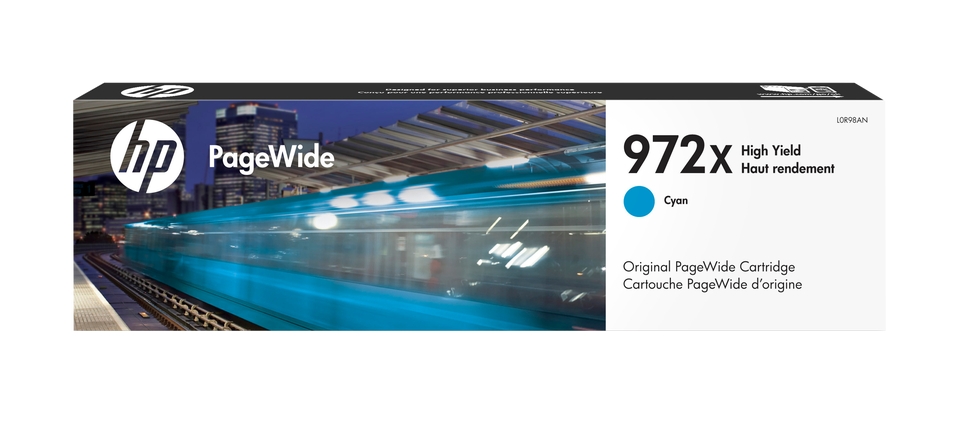
The 577dw (US model) uses HP 972-series and 976Y cartridges. Yields per HP's specs (ISO 24711):
| Cartridge | Black | Each color |
|---|---|---|
| HP 972A (standard) | ~3,500 pages | ~3,000 pages |
| HP 972X (high yield) | ~10,000 pages | ~7,000 pages |
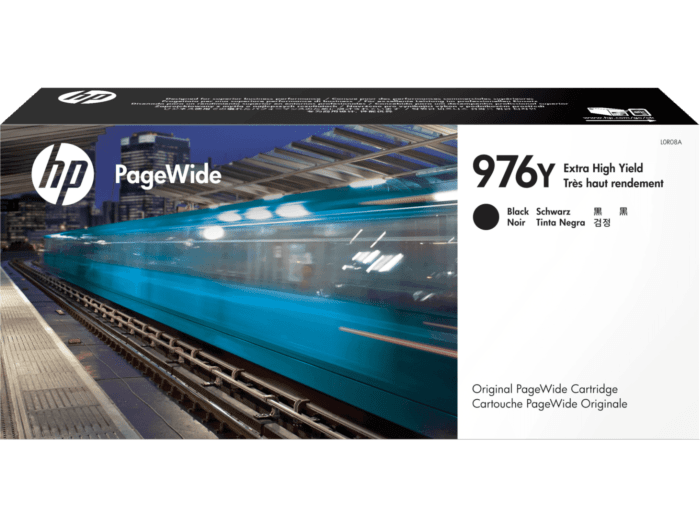
| HP 976Y (extra high yield, PageWide Pro 500 series only) | ~17,000 pages | ~13,000 pages |
The 17,000 / 13,000 page figures in my original draft are for the 976Y extra-high-yield cartridges, which are sold separately. The box only includes setup cartridges. In other regions the same printer uses different cartridge numbers (for example 975/976Y in Europe), so check your local model.
HP's product page states that the printer only works with cartridges that have a new or reused HP chip, and that dynamic security, maintained through periodic firmware updates, blocks cartridges with non-HP chips. HP's page for this model doesn't mention HP+, the newer subscription-linked program.
Pros and cons
Pros
- Fast: up to 50 ppm (ISO) and 70 ppm in General Office mode
- Very high-yield 976Y cartridges keep cost per page low for high-volume offices
- Single-pass two-sided 50-sheet ADF with email, folder and SharePoint destinations
- Prints Word and PowerPoint files straight from USB
- Sturdy paper handling: 550 sheets standard, expandable to three trays
- No fuser, drum or toner to replace
Cons
- Discontinued, so new units are scarce and long-term support is a consideration
- Dynamic security restricts non-HP-chip cartridges
- Slow cold startup (about 36 seconds in Tom's Guide's test)
- Large and heavy for a small desk
- No HP Sure Start or run-time intrusion detection, which are Enterprise-class features
- A full set of cartridges is expensive up front
How it compares
| HP PageWide Pro 577dw | HP Color LaserJet Pro MFP M479fdw | HP PageWide Pro 477dw | |
|---|---|---|---|
| Technology | PageWide inkjet (print bar) | Color laser (toner) | PageWide inkjet (print bar) |
| Status | Discontinued; HP points buyers to the M479fdw | HP's suggested newer alternative | Discontinued sibling, smaller and slower |
| Extra-high-yield 976Y ink | Yes | No (toner) | No (972-series only) |
| Best for | High-volume color offices that want low running costs | Buyers who want a current model with laser toner | Lighter workloads on the same ink platform |
Cool Other Gadgets
Check out TEMU for some cool other gadgets
Buying checklist
- [ ] Your volume fits HP's recommended 1,000–6,000 pages per month
- [ ] You're comfortable buying a discontinued model (new old stock, refurbished or used)
- [ ] You can source genuine HP 972/976Y cartridges (or your regional equivalent) at a reasonable price
- [ ] You accept that dynamic security can block non-HP-chip cartridges
- [ ] You need two-sided scanning, scan-to-email or folder destinations, and fax
- [ ] You have room for a large MFP, or plan to add the optional tray and stand
- [ ] Confirm the exact model (D3Q21A) and what cartridges are included in the box
See the HP PageWide Pro 577dw listing on Amazon to check the condition and the seller before you buy.
Verdict
The HP PageWide Pro 577dw is still one of the more capable workgroup color MFPs of its generation. It's fast in General Office mode, has a genuinely useful single-pass duplex ADF and very high-yield cartridges, and it can print Office files from USB. Its "hidden" security is more modest than the draft claimed: it has secure boot, signed firmware and PIN printing, not Enterprise-grade Sure Start. It's also a 2016 design that HP has discontinued, with cartridge restrictions you need to accept. If you find one at a good price and print enough to benefit from 976Y yields, it makes sense. Otherwise, a current model like the M479fdw is the safer long-term buy.
Check today's price for the HP PageWide Pro 577dw
Some links in this article are affiliate links — see our affiliate disclosure. Want to know how we pick products? Read more about TwizzyMedia.
Frequently asked questions
How fast is the HP PageWide Pro 577dw?
HP rates it at up to 50 ppm in black and color in Professional (ISO) mode and up to 70 ppm in General Office mode. The first page comes out in as little as 6 seconds for black and 6.5 seconds for color, from ready.
Does the PageWide Pro 577dw have HP Sure Start?
No. HP lists secure boot, secure code integrity validation, signed firmware and PIN printing for this model. Sure Start, whitelisting and run-time intrusion detection are marketed for HP's Enterprise printers.
What cartridges does the 577dw use and how many pages do they print?
In the US it uses HP 972A (about 3,500 black / 3,000 color pages), 972X (about 10,000 black / 7,000 color) and 976Y extra high yield (about 17,000 black / 13,000 color) cartridges.
Does the PageWide Pro 577dw scan both sides in one pass?
Yes. The 577 series has a 50-sheet single-pass, two-sided automatic document feeder, rated at up to 26 images per minute for one- and two-sided scans (A4).
Can it print Word files from a USB drive?
Yes. It can print Microsoft Word and PowerPoint files (Office 2003 and later, Latin fonts only) directly from a USB drive.
Is the HP PageWide Pro 577dw still sold?
HP has discontinued it and points buyers to the Color LaserJet Pro MFP M479fdw. You'll mainly find remaining stock, refurbished or used units from retailers.